
A UX audit of Ask Gemini and AI Mode in Chrome - two tools built by the same company, living in the same browser, solving overlapping problems without talking to each other. This project traces the seam between them and proposes a unified research surface.
What Ask Gemini and AI Mode look like today, what they do, and where they fall short.
AI Mode - Google Search
What it does
Answers questions quickly with verified sources from the web. Built for search-like interactions.
Best for
Quick answers - fact checking
Current events - sourced research
Ask Gemini - Chrome Side Panel
What it does
Deep analysis, coding, long-form reasoning and research. Built for multi-turn, persistent conversation.
Best for
Deep research - coding - analysis
Long sessions - complex thinking
The seam
Both tools exist in isolation. Switching between them erases context.
The user carries the cognitive burden of bridging two separate AI experiences.
Two users. Real observations. No invented data.
User 1
University student
Assignment research and exam prep
Observed using Ask Gemini for real assignment research. Interviewed after.
Regular Chrome user. Relies on verified sources for academic submission.
User 2
UX designer, researcher
Extended research and AI tool comparison
Personal use over multiple weeks. Documented friction points in real time.
Heavy Chrome user. Switches between AI Mode and Ask Gemini regularly for extended research sessions.
Direct quotes. User 1 is the student. User 2 is me.
"I need to know where the information came from - not because I don't trust it, but because I can't submit work without citations."
"I spent hours on a research thread in AI Mode. Days later I went back to Gemini to find it and got frustrated."
"Both tools exist but they don't know about each other. I'll have to give the background info again."
Both tools exist but they don't know about each other. The user ends up being the bridge - and that's exhausting during deep research.
AI Mode
Google Search
Sourced · fast · search-like
Ask Gemini
Chrome Side Panel
Analytical · persistent · pane
The user
Manually carries context
re-explains, re-prompts, re-orients - every time
The seam
The gap no one designed for
What was chosen to solve and why - traceable back to the findings.
01
AI Mode shortcut inside Ask Gemini panel
A persistent button inside the Ask Gemini side panel that surfaces the user's most recent AI Mode conversation - without leaving Chrome or opening a new tab.
Solves: context loss · the seam · U2 finding
02
Inline source attribution with credibility signal
Every Gemini answer shows inline superscript citations. Hovering reveals a source card showing the domain, date and a verified badge where applicable.
Solves: source confusion · trust anxiety · U1 findings
03
Shared session history across AI Mode and Gemini
A unified research history visible in both tools. If a conversation starts in AI Mode it appears in Gemini's history tab - searchable, resumable, never lost across accounts.
Solves: lost context · account confusion · U2 findings
The proposed UI showing the unified research surface.
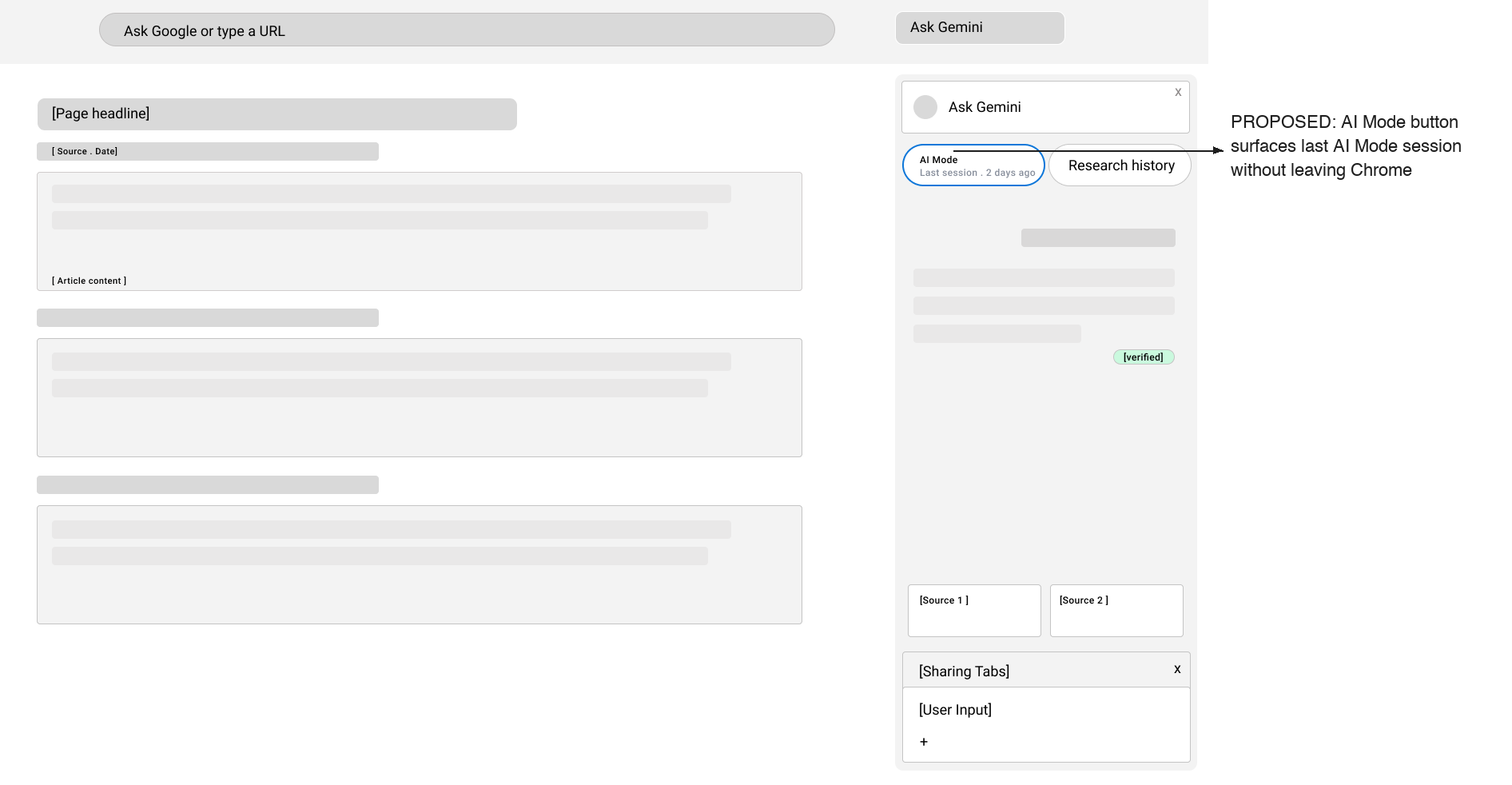
The proposal lives in one interaction, deliberately kept low fidelity to keep the focus on structure, not polish.
The Gemini panel on the right follows Chrome's existing side panel structure so the change reads as something that could ship tomorrow, not a reimagined product. The hero of this screen is the button row beneath the panel header - two buttons that don't exist in the current product. AI Mode - last session 2 days ago surfaces a lost research thread from AI Mode directly inside the Gemini panel, no new tab, no account switching. Research history gives access to a unified session log across both tools.
Why this stays low fidelity
This wasn't designed as a finished feature - it was designed as a proof of concept for a gap I noticed using the product myself, then validated through two independent research conversations. The value here is in the diagnosis: naming a seam between two Google products that users feel but rarely articulate.